Registration settings
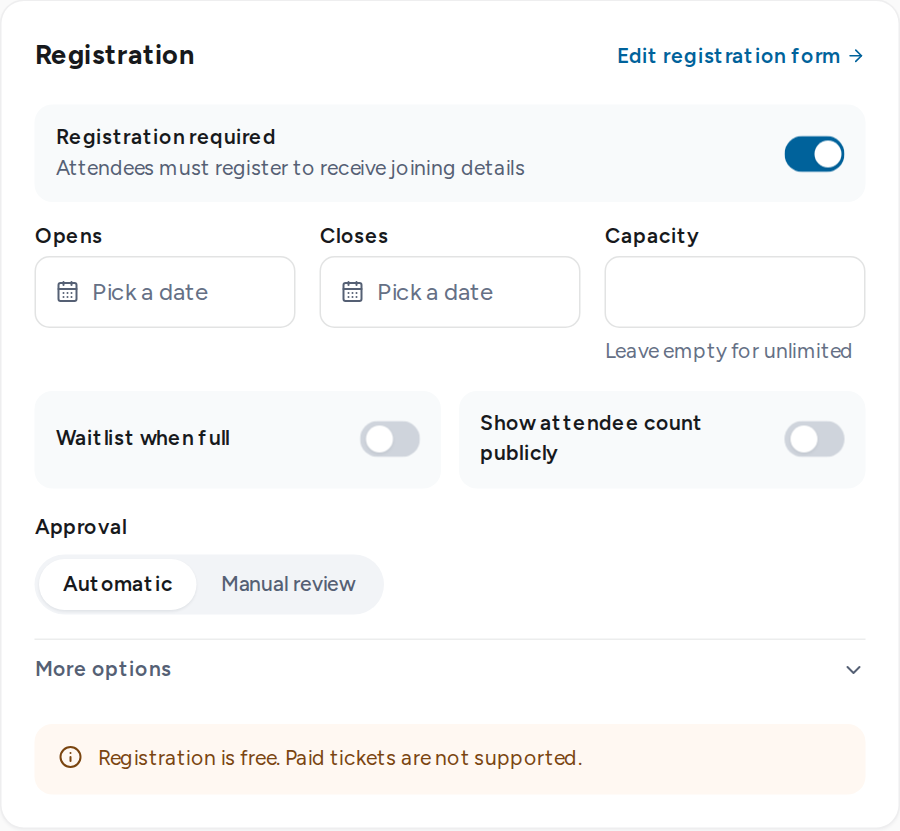
The Registration card in Event setup controls who can register, when, and how places are given.
Settings
| Setting | Effect |
|---|---|
| Registration required | Off: the event page shows No registration needed and has no button. |
| Opens · Closes | The registration window. Both fall on or before the event's last day. Empty means open until the event ends. |
| Capacity | The number of confirmed places. Empty means unlimited. It cannot go below the places already confirmed. |
| Waitlist when full | On: a full event offers Join the waitlist. Off: it shows Event full. |
| Show attendee count publicly | With a capacity set, the event page shows how many registered and the places left. |
| Approval | Automatic confirms each registration. Manual review holds every registration for an organizer. |
| Confirmation message | Added to the confirmation email as a note from the organizer. |
| Closed message | Shown when registration is closed or full. |
How the waitlist moves
When a confirmed attendee cancels, or capacity is raised, the first person on the waitlist moves up at once. On an automatic event they are confirmed. On a manual-review event they move to Awaiting approval. Each person is emailed.
Pricing
Registration is free. Paid tickets are not supported.